shadow_stencil
Determines the type of dynamic shadows cast by models. Must be set before level loading.
Range:
-1 - No dynamic shadows.
0 -
Decal shadows (default). 7.66
1 -
A7 Z-pass stencil shadows.
A8 Accelerated z-pass stencil shadows.
2 -
A7 Z-fail stencil shadows. A8 Accelerated z-fail stencil shadows.
8 -
Script-based shadows (such as PSSM shadows).
Type:
var
Remarks:
Decal shadows are no 'real' shadows, but just a diffuse darkness on the surface underneath the shadow throwing object, regardless of any light sources. Stencil shadows are real shadows cast from the sun or the closest light source.
Due to the hard
shadow edges, especially with self shadows, they look best in levels with strong light contrasts. They can be blurred with a postprocessing shader. Both types of shadows follow the ground shape and can bend around edges.
 |
 |
 |
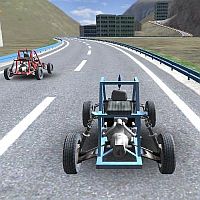
| General decal shadow |
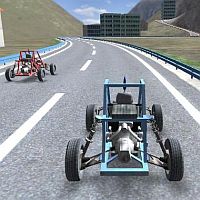
Individual decal shadow |
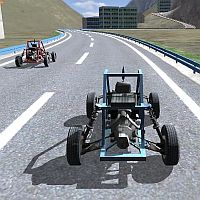
Stencil self-shadow |
 |
 |
 |
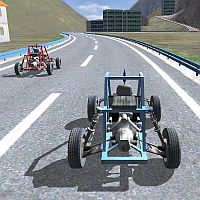
| Stencil without self-shadow |
Poisson blurred stencil shadow |
PSSM self-shadow |
Some remarks about decal shadows:
-
Decal shadows require a level compiled in Mesh mode. Old A5/A6 levels must be recompiled with A7 or A8.
-
Individual decal shadows can be set through the shadow pointer, even when stencil shadows are activated. This allows to give some models decal shadows, and other models stencil shadows.
-
The transparency of decal shadows can be set through mtl_shadow.alpha (default = 50).
The size of a decal shadow is twice the difference of max_x and min_x.
-
Decal shadows can have a shader through mtl_shadow.effect. Please note that when stencil shadows and decal shadows are used at the same time, mtl_shadow.effect affects both shadow types - therefore stencil shadow effects, such as stencil_blur(), can not be used in this case.
- Except for chunked terrain, decal shadows only affect a single mesh on the ground. For this reason group floor parts, stairs etc. together and check their Single Mesh option. Otherwise decal shadows will be cut off at block boundaries, or continue along the floor mesh through walls.
-
The position of decal shadows is determined by tracing a ray from the entity top down to the ground. If another model is in the way - such as an attached surfboard, a low carried weapon, an internal collision model, or whatever - the decal shadow won't appear on the ground. This can be prevented by setting shadow_mode |= IGNORE_MODELS.
-
Decal shadows replace the z-buffer shadows that were introduced with A5. Z-buffer shadows are not supported anymore.
Some remarks about stencil
shadows:
- Stencil shadows are normally slower
than decal shadows, and require video hardware with 8 bit stencil buffer support. All video cards manufactured
after 2000 fulfil this requirement.
On older video cards, the engine automatically switches back to decal shadows.
- Accelerated stencil shadows render up to 10x faster than normal stencil shadows. They require video hardware with basic vertex shader support (vertex shader model 1.0 or above). All video cards manufactured
after 2003 fulfil this requirement. On older video cards, the engine automatically switches back to non-accelerated stencil shadows.
A7 supports accelerated stencil shadows only with the Pro edition;
with A8, stencil shadows are always accelerated.
-
P Stencil shadow rendering can be further sped up by using internal LOD steps of the model. By default, shadows are cast from the first LOD step. This can be modified through the shadow_lod variable. Using both techniques - accelerated shadows and internal LOD steps - stencil shadows even from complex models render almost as fast as decal shadows.
-
For preventing self shadowing of an entity, set its CAST flag together with the SHADOW flag.
-
Stencil shadows are only cast
by nontransparent, non-invisible model entities. If the entity texture is transparent, i.e. if it's 32 bit with alpha channel, the entity can't cast a stencil shadow unless opaque rendering is enforced by setting its PASS_SOLID material flag.
-
C Stencil shadows can be blurred for creating smooth shadows. For this you could use a postprocessing stage as shown under render_target; however it's easier to assign a blur effect to mtl_shadow.effect. The latter has also the advantage to allow non-self-shadows, which would not be possible in a postprocessing stage. Calling stencil_blur(1) activates the predefined poisson blur shader (see also render_stencil).
- Individual stencil shadows can be set through the shadow pointer.
-
The transparency of stencil shadows can be set through mtl_shadow.alpha (default = 50), and their color
can be set through mtl_shadow.diffuse_blue, mtl_shadow.diffuse_green, and mtl_shadow.diffuse_red (default = 0,0,0 = black).
- Stencil shadows
require
models
consisting of closed meshes. The meshes must have no holes, and no polygons must
intersect each other or touch each other with their flat side. Otherwise
rendering errors (dark lines projecting from the model to the shadow) can
be visible. In a closed mesh, every edge is shared by exactly two triangles.
If the model's mesh is not closed, create a closed mesh LOD model
or shadow model
for shadow
casting. The MED mesh
tester can
be used for determining whether a mesh is closed or not.
- Stencil shadows can be cast from the sun or from dynamic lights. In the latter case
the light emitting entity must have the CAST flag set. A stencil shadow
is cast by the strongest dynamic light that reaches the origin of the entity.
If the entity origin is not within the range of any light, the shadow is
cast by the sun.
Shadow casting lights must not be inside a shadow throwing object.
- Stencil shadows are not clipped by walls. A shadow can be cast on a wall,
at the back side of the wall, and on the floor behind the wall at the same
time. Take care that level and models are dark in unlit parts, or
use the CAST flag to prevent self shadows.
- Stencil shadows are also visible on model polygons that point away from
the light source, which can lead to undesired shadow polygons. To avoid this,
use a material with low ambient and a high diffuse part.
- On surfaces precisely perpendicular to the light source,
z-beating effects can occur between the shadow and the surface. The
engine uses a depth bias value to prevent z-beating, however some
old 3D cards don't support depth bias.
- Z-pass stencil shadows are faster than z-fail shadows,
but don't allow to move the camera into a shadow volume.
They are the best method for elevated 3rd person
cameras, like in an isometric game. In first person
mode the player's shadow is automatically switched off when z-pass
stencil shadows are activated.
- Z-fail stencil shadows are a little slower than z-pass shadows, but more
robust. They are independent of the camera position and allow LOD
models to differ greatly from the original model, which would otherwise
cause shadow faults with the z-pass algorithm.
Z-fail shadow volumes are columns rather than cones, although the
difference is only visible with close lights,
and can lead to disconnected shadows of connected meshes in such a case
. A script can
be used for tracing a ray from a light source to the camera, and
automatically switching to z-fail shadows when the ray hits an obstacle.
Example:
#include <mtlView.c> // contains the stencil_blur() function
...
function main()
{
  ...
  shadow_stencil = 2; // activate z-fail stencil shadows
  shadow_lod = 2; // use the second LOD stage for stencil shadows
  stencil_blur(1); // activate blurred shadows
  ...
See also:
SHADOW, CAST, shadow_lod,
shadow_range, shadow_threshold,
render_stencil, shadow
► latest
version online